WEEK2-MISC
VidarToken
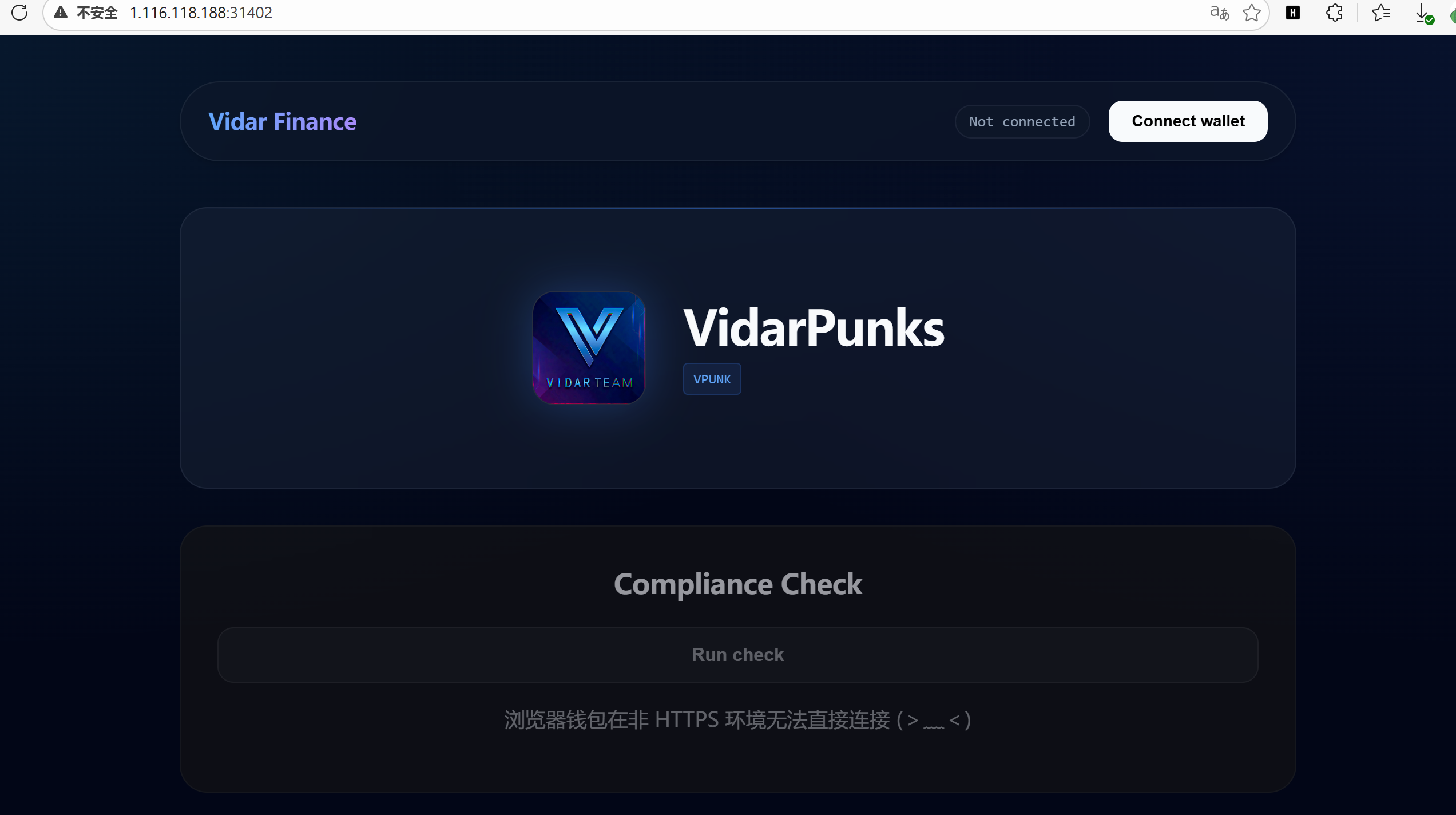
长得有点像web3钱包
[00:16:00] 200 -    2KB - /app.js
[00:16:03] 200 -    1KB - /index.html
[00:16:06] 400 -    43B - /rpc/
[00:16:06] 400 -     0B - /rpcwithcert/
const rpcUrl = `${window.location.origin}/rpc`;
const vaultStatusEl = document.getElementById("vault-status");
const walletStatusEl = document.getElementById("wallet-status");
const appContentEl = document.getElementById("app-content");

let entranceAddress = null;
let walletProvider = null;

vaultStatusEl.textContent = "请先连接 (。•̀ᴗ•́。)";

function readCString(mem, offset, max = 128) {
  const bytes = new Uint8Array(mem.buffer, offset, max);
  let out = "";
  for (let i = 0; i < bytes.length; i++) {
    if (bytes[i] === 0) break;
    out += String.fromCharCode(bytes[i]);
  }
  return out;
}

async function connectWallet() {
  walletProvider = null;
  walletStatusEl.classList.remove("active");
  appContentEl.classList.add("locked");
  appContentEl.classList.remove("unlocked");
  vaultStatusEl.textContent = "浏览器钱包在非 HTTPS 环境无法直接连接 (>﹏<)";
}

async function checkEligibility() {
  vaultStatusEl.textContent = "尝试读取元数据... (。•̀ᴗ•́。)";
  try {
    if (!entranceAddress) {
      const res = await fetch("/wasm/k.wasm", { method: "GET" });
      if (res.ok) {
        const wasm = await res.arrayBuffer();
        const { instance } = await WebAssembly.instantiate(wasm, {});
        const ptr = instance.exports.get_entrance();
        const text = readCString(instance.exports.memory, ptr, 80);
        const match = text.match(/ENTRANCE=(0x[a-fA-F0-9]{40})/);
        entranceAddress = match ? match[1] : "";
      }
    }

    if (!entranceAddress) {
      vaultStatusEl.textContent = "入口未就绪 (´• ω •`)";
      return;
    }

    const provider = new ethers.JsonRpcProvider(rpcUrl);
    const vault = new ethers.Contract(
      entranceAddress,
      ["function tokenURI(uint256) view returns (string)"],
      provider
    );

    await vault.tokenURI(0);
    vaultStatusEl.textContent = "元数据已就绪 (。•̀ᴗ•́。)";
  } catch (err) {
    vaultStatusEl.textContent = "读取失败 (。•́︿•̀。)";
  }
}

function safe(fn) {
  return async () => {
    try {
      await fn();
    } catch (err) {
      if (vaultStatusEl) vaultStatusEl.textContent = err.message || String(err);
    }
  };
}

document.getElementById("connect-wallet").addEventListener("click", safe(connectWallet));
const checkBtn = document.getElementById("check-eligibility");
if (checkBtn) {
  checkBtn.disabled = true; //页面交互禁用
  checkBtn.setAttribute("aria-disabled", "true");
}
这段js有问题啊,页面是点不了的,还会弹伪报错。
流程是这样的:加载/wasm/k.wasm 随后调用其导出函数get_entrance() 从内存中读取ENTRANCE=(0x[a-fA-F0-9]{40})得到合约地址 随后使用ethers.js 连接到/rpc 调用合约tokenURI(0)
先获取合约地址
// 1. 定义读取内存字符串的辅助函数(原代码中的函数)
function readCString(mem, offset, max = 128) {
  const bytes = new Uint8Array(mem.buffer, offset, max);
  let out = "";
  for (let i = 0; i < bytes.length; i++) {
    if (bytes[i] === 0) break;
    out += String.fromCharCode(bytes[i]);
  }
  return out;
}

// 2. 手动加载 WASM 并提取地址
fetch("/wasm/k.wasm")
  .then(res => res.arrayBuffer())
  .then(async wasm => {
    const { instance } = await WebAssembly.instantiate(wasm, {});
    const ptr = instance.exports.get_entrance();
    const text = readCString(instance.exports.memory, ptr, 80);
    console.log("WASM返回的原始文本:", text);

    const match = text.match(/ENTRANCE=(0x[a-fA-F0-9]{40})/);
    if (match) {
        console.log("拿到合约地址了:", match[1]);
        // 把地址存到全局变量,方便下一步使用
        window.targetAddress = match[1];
    } else {
        console.error("未找到地址格式");
    }
  });

WASM返回的原始文本: ENTRANCE=0x39529fdA4CbB4f8Bfca2858f9BfAeb28B904Adc0
接下来模拟tokenURI调用
async function solve() {
    const contractAddress = "0x39529fdA4CbB4f8Bfca2858f9BfAeb28B904Adc0";
    const rpcUrl = "/rpc"; // 题目中的相对路径

    // 1. 构造 tokenURI(0) 的调用数据
    // tokenURI(uint256) 的函数签名哈希是 c87b56dd
    // 参数 0 需要补齐为 64 位的 16 进制
    const functionSelector = "0xc87b56dd";
    const parameter = "0000000000000000000000000000000000000000000000000000000000000000";
    const data = functionSelector + parameter;

    console.log("正在发送 RPC 请求...");

    // 2. 发送 eth_call 请求
    const response = await fetch(rpcUrl, {
        method: "POST",
        headers: { "Content-Type": "application/json" },
        body: JSON.stringify({
            jsonrpc: "2.0",
            method: "eth_call",
            params: [
                {
                    to: contractAddress,
                    data: data
                },
                "latest"
            ],
            id: 1
        })
    });

    const json = await response.json();

    if (json.error) {
        console.error("RPC 报错:", json.error);
        return;
    }

    const rawHex = json.result;
    console.log("RPC 返回原始 Hex:", rawHex);

    // 3. 解码返回的字符串
    // 返回数据格式通常是 ABI 编码:[32字节偏移量] [32字节长度] [字符串内容...]
    // 我们直接粗暴一点,把 Hex 转成 ASCII 并提取可打印字符即可看到 Flag
    let str = "";
    // 去掉开头的 0x
    const cleanHex = rawHex.replace("0x", "");
    for (let i = 0; i < cleanHex.length; i += 2) {
        const charCode = parseInt(cleanHex.substr(i, 2), 16);
        // 过滤出可打印字符 (Flag通常在这里面)
        if (charCode >= 32 && charCode <= 126) {
            str += String.fromCharCode(charCode);
        }
    }

    console.log("%c▼ ▼ ▼ 最终结果 ▼ ▼ ▼", "color: lime; font-size: 14px;");
    console.log(str);
    alert("解码结果: " + str);
}

solve();
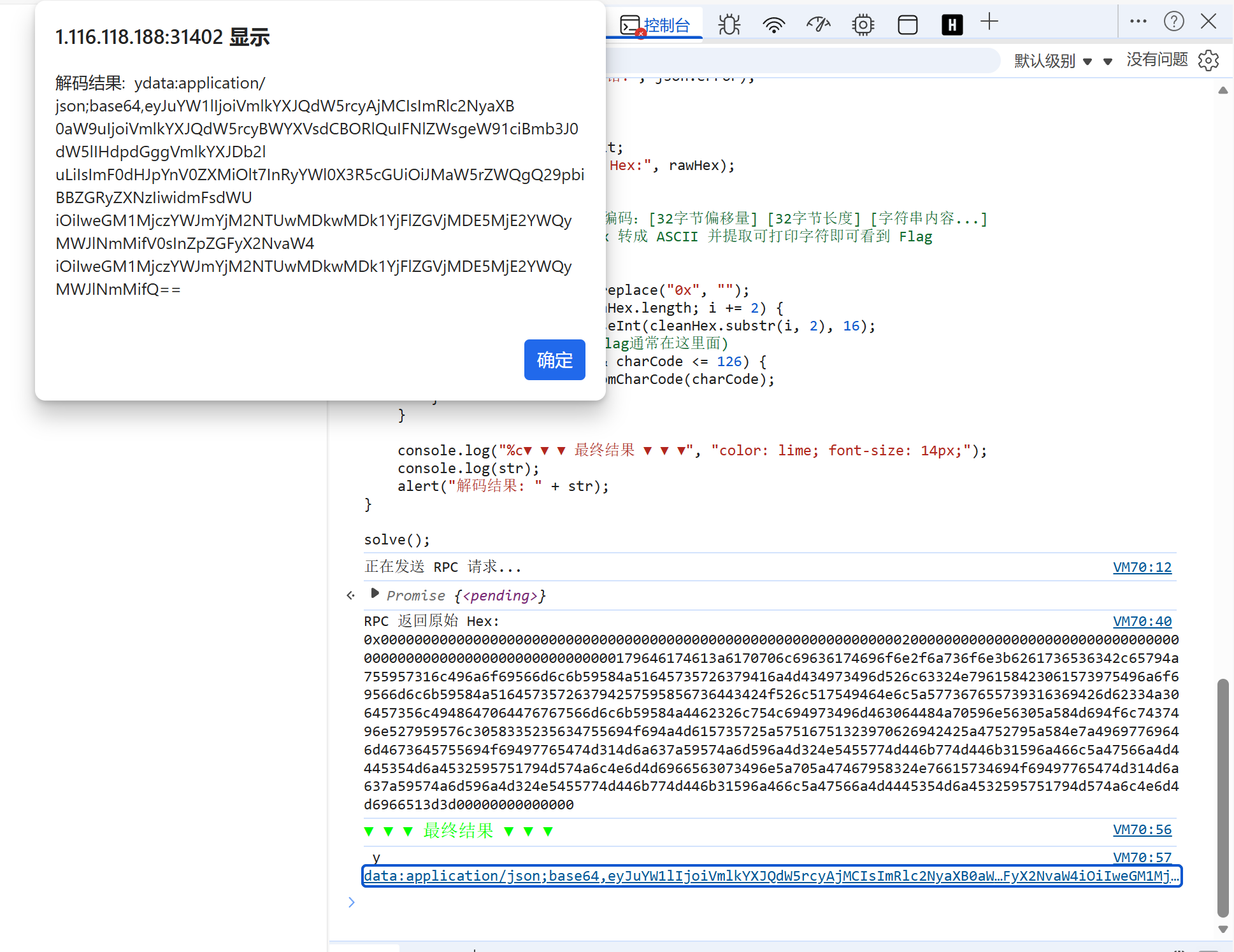
{"name":"VidarPunks #0","description":"VidarPunks Vault NFT. Seek your fortune with VidarCoin.","attributes":[{"trait_type":"Linked Coin Address","value":"0xc5273abfb36550090095b1edec019216ad21be6c"}],"vidar_coin":"0xc5273abfb36550090095b1edec019216ad21be6c"}
我们得到了一个vidar_coin 地址
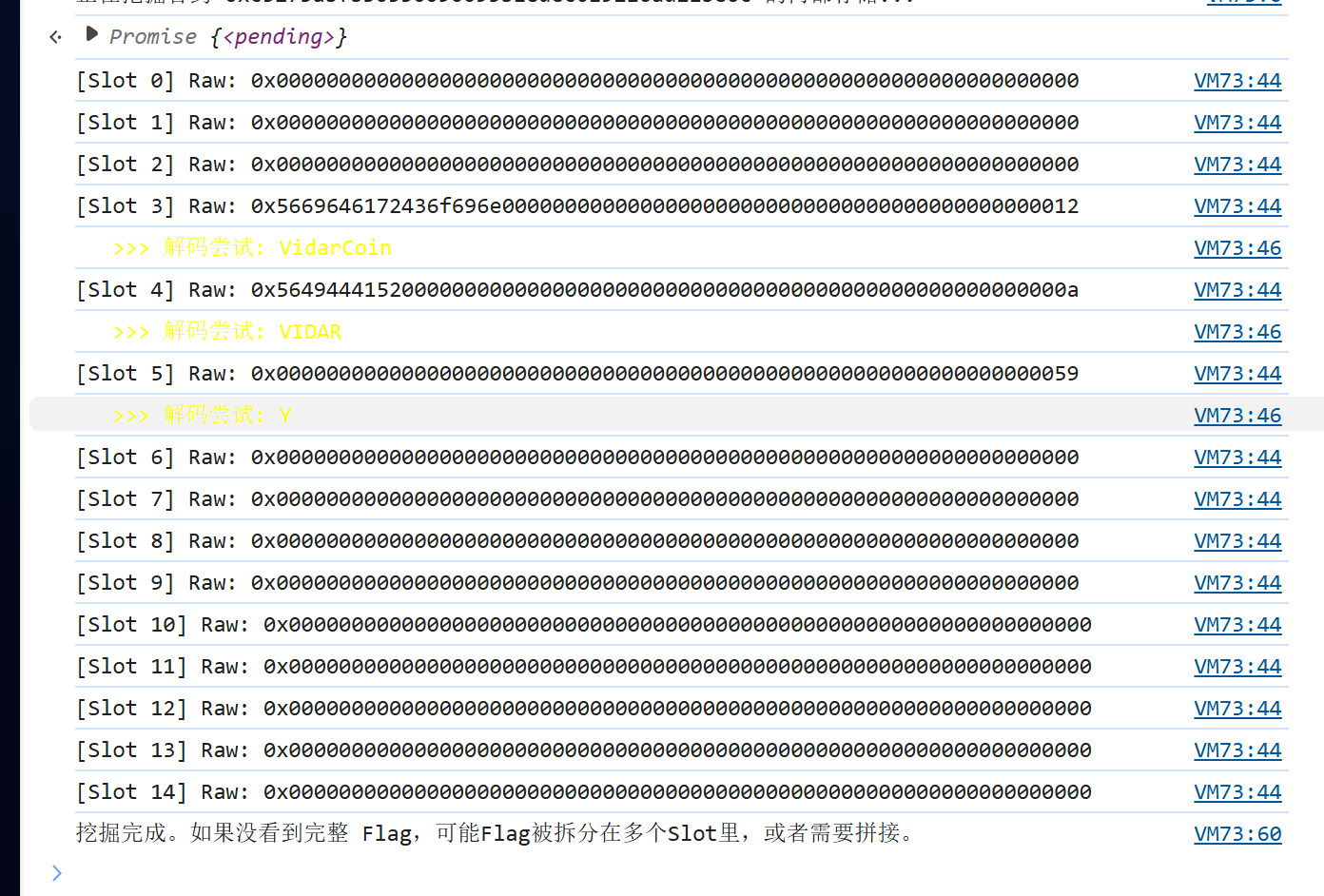
async function digVidarCoin() {
    // 这是你 JSON 里解出的新地址
    const targetAddress = "0xc5273abfb36550090095b1edec019216ad21be6c";
    const rpcUrl = "/rpc";

    console.log(`正在挖掘合约 ${targetAddress} 的内部存储...`);

    // 辅助函数:十六进制转字符串
    function hexToString(hex) {
        let str = "";
        hex = hex.replace(/^0x/, "");
        for (let i = 0; i < hex.length; i += 2) {
            const code = parseInt(hex.substr(i, 2), 16);
            if (code >= 32 && code <= 126) { // 只显示可打印字符
                str += String.fromCharCode(code);
            }
        }
        return str;
    }

    // 遍历读取前 15 个存储槽 (Slot 0 - Slot 14)
    for (let i = 0; i < 15; i++) {
        // 构造 eth_getStorageAt 请求
        // 参数:[地址, 槽位索引(hex), 区块高度]
        const slotHex = "0x" + i.toString(16);

        try {
            const response = await fetch(rpcUrl, {
                method: "POST",
                headers: { "Content-Type": "application/json" },
                body: JSON.stringify({
                    jsonrpc: "2.0",
                    method: "eth_getStorageAt",
                    params: [targetAddress, slotHex, "latest"],
                    id: i
                })
            });
            const json = await response.json();
            const rawData = json.result;

            // 尝试解码看看有没有像 Flag 的东西
            const decoded = hexToString(rawData);

            console.log(`[Slot ${i}] Raw: ${rawData}`);
            if (decoded.length > 0) {
                console.log(`%c   >>> 解码尝试: ${decoded}`, "color: yellow");
            }

            // 如果发现 Flag 格式,弹窗提示
            if (decoded.includes("Vidar{") || decoded.includes("flag{")) {
                console.log(`%c🎉 找到 Flag 了!`, "font-size: 20px; color: lime");
                alert("Flag found in Slot " + i + ":\n" + decoded);
                return;
            }

        } catch (e) {
            console.error(`读取 Slot ${i} 失败`, e);
        }
    }
    console.log("挖掘完成。如果没看到完整 Flag,可能Flag被拆分在多个Slot里,或者需要拼接。");
}

digVidarCoin();
接下来 调 tokenURI(0):NFT 元数据里给出下一跳 Coin 地址
对 entrance 调 tokenURI(0),解出 JSON:
{
  "name":"VidarPunks #0",
  "vidar_coin":"0xc5273abfb36550090095b1edec019216ad21be6c",
  "attributes":[{"trait_type":"Linked Coin Address","value":"0xc5273abf...be6c"}]
}
这一步对应题面 “Punks and Coins collide”:Punks(NFT) 指向 Coin 合约,让你去挖 Coin。
枚举 Coin 合约:看起来像 ERC20,但 symbol 很异常
对 Coin 地址做常见 ERC20 查询:
-
name() = VidarCoin -
decimals() = 26 -
totalSupply() = 0 -
logs = 0 -
symbol() 返回一长串 hex 字符串:0x6960606a...607a
这些现象组合起来基本说明:
- 它不是正常代币,像“谜题容器”
-
symbol被故意改造成“密文载体”
从 bytecode 提取 selector:发现 3 个自定义函数,但全都空 revert
你从 eth_getCode 扫 PUSH4,得到 12 个 selector:
9 个是标准 ERC20,另外 3 个自定义:
-
0x64656600 -
0xc4a11628 -
0x43000821
对这三个 selector 做各种参数和 from(包括 ownerOf(0) 的 owner、entrance、coin 自己)测试,结果始终是:
-
execution reverted 且data: 0x(空 revert reason)
这一步结论是:自定义函数不是直接给答案的路径(至少在现有条件下完全不可用),更像干扰/门槛。
改走“链上取证”:读 storage,确认 symbol 密文来自动态字符串存储
你扫 eth_getStorageAt 发现:
-
slot3/slot4 是短字符串(能看出VidarCoin、VIDAR) -
slot5 = ...0059
这里 0x59 的最低位是 1,符合 Solidity 对 动态 bytes/string “短编码/长编码” 的约定:
当 slot 存的是 “2*len+1” 时表示长字符串,长度为 (0x59-1)/2 = 44 字节。
而你 symbol 的密文刚好是 44 bytes,于是可以断定:flag(或密文)被当作动态字符串/bytes 存在 storage。
从 keccak256(slot) 位置把 44 bytes 原样读出来(绕过 symbol 任何加工)
动态字符串真实数据存放在:
-
base = keccak256(pad32(slotIndex)) - 从
base开始按 32 字节 word 读取
你用 web3_sha3(pad32(5)) 得到:
-
base = 0x036b...3db0
然后:
-
word0 +word1 拼起来正好是那 44 bytes 密文(完全对上symbol())
这一步非常关键:你拿到的是链上原始密文,不再依赖合约函数返回如何编码。
利用已知 flag 前缀 hgame{ 反推 XOR key,得到最终 flag
const hex = "0x6960606a647c542a3545726848725534307e5e4c4f487658445562587647726a2c5d5b7d303737333537607a";

function hexToBytes(h){
  h = h.startsWith("0x") ? h.slice(2) : h;
  const out = new Uint8Array(h.length/2);
  for(let i=0;i<out.length;i++) out[i]=parseInt(h.slice(i*2,i*2+2),16);
  return out;
}
function bytesToStr(b){ return new TextDecoder().decode(b); }

function addMod256(b, k){
  const o=new Uint8Array(b.length);
  for(let i=0;i<b.length;i++) o[i]=(b[i]+k)&255;
  return o;
}
function xorByte(b, k){
  const o=new Uint8Array(b.length);
  for(let i=0;i<b.length;i++) o[i]=b[i]^k;
  return o;
}
function xorRepeat(b, keyStr){
  const key = new TextEncoder().encode(keyStr);
  const o=new Uint8Array(b.length);
  for(let i=0;i<b.length;i++) o[i]=b[i]^key[i%key.length];
  return o;
}
// rot95 on printable ASCII (0x20..0x7e); keep others unchanged
function rot95(b, shift){
  const o=new Uint8Array(b.length);
  for(let i=0;i<b.length;i++){
    const c=b[i];
    if (c>=0x20 && c<=0x7e){
      const pos=c-0x20;
      o[i]=0x20 + ((pos+shift)%95+95)%95;
    } else o[i]=c;
  }
  return o;
}
function interesting(s){
  return /flag\{|ctf\{|FLAG\{|[{}]/.test(s);
}

(() => {
  const b = hexToBytes(hex);
  const keys = ["VIDAR", "VidarCoin"];

  // 1) mod256 shifts
  for (let k=-64;k<=64;k++){
    const s = bytesToStr(addMod256(b,k));
    if (interesting(s)) console.log("[addMod256]", k, s);
  }

  // 2) rot95 shifts (printable)
  for (let k=-94;k<=94;k++){
    const s = bytesToStr(rot95(b,k));
    if (interesting(s)) console.log("[rot95]", k, s);
  }

  // 3) single-byte xor
  for (let k=0;k<256;k++){
    const s = bytesToStr(xorByte(b,k));
    if (interesting(s)) console.log("[xor]", k, s);
  }

  // 4) xor repeating keys
  for (const key of keys){
    const s = bytesToStr(xorRepeat(b,key));
    if (interesting(s)) console.log("[xorRepeat]", key, s);
  }
})();
先做了暴力(rot95、单字节 XOR),看到单字节 XOR=7 时已经出现了 ...{...} 结构,这提示“确实是 XOR 类加密”。
但你补充规则:flag 必须以 hgame{ 开头。于是做已知明文攻击:
- 密文第 1 字节
0x69 应该解成'h'(0x68) ⇒ key[0] =0x69 ^ 0x68 = 0x01 - 密文第 2 字节
0x60 应该解成'g'(0x67) ⇒ key[1] =0x60 ^ 0x67 = 0x07 - 再验证第 3/4 字节也符合交替
0x01,0x07
因此 key 是 **2 字节循环 XOR:** [0x01, 0x07] 交替。
用该 key 解出明文,得到最终 flag:
hgame{U-4BsoIuT31y_KNOw_ERc_w@sm-ZZz106440a}
Invest on Matrix
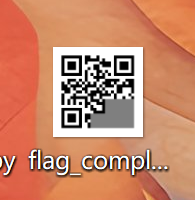
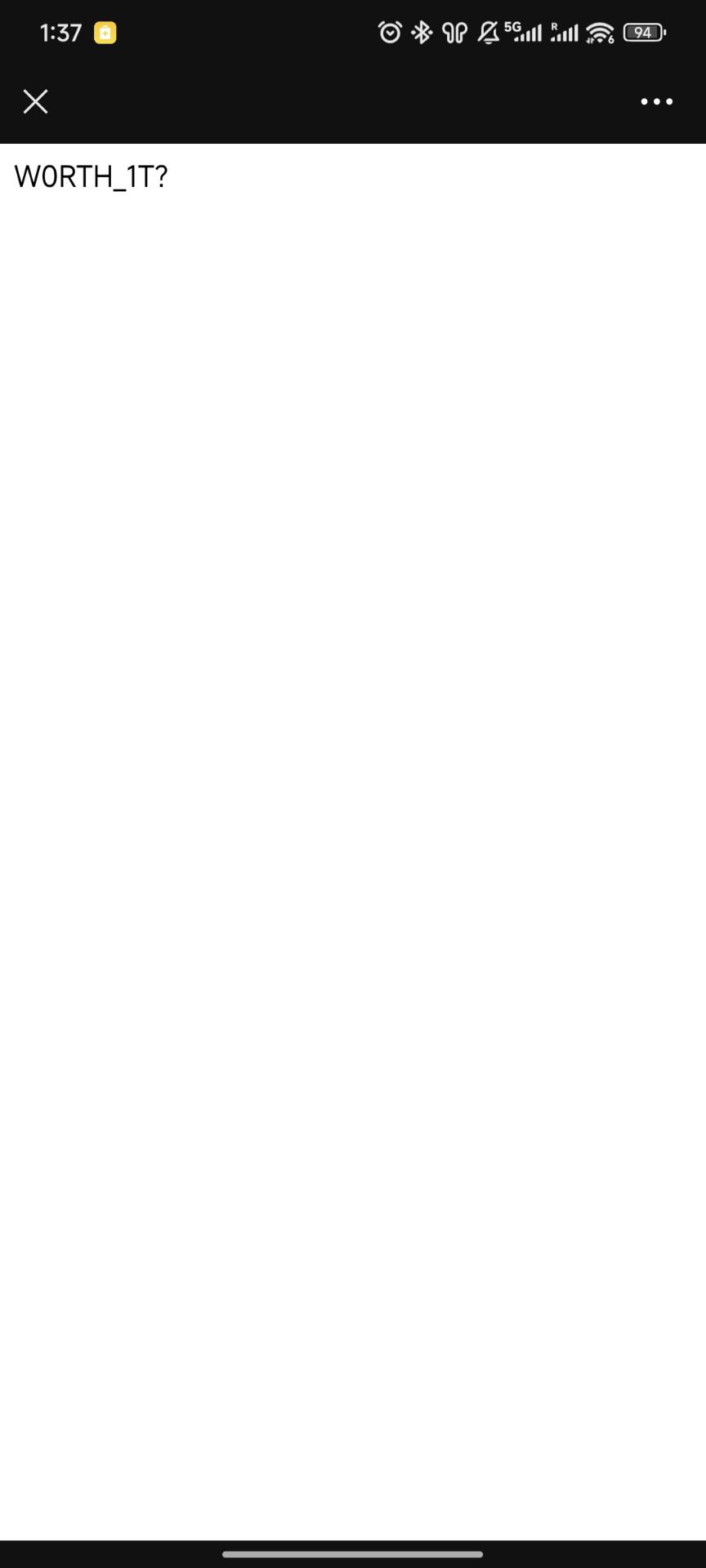
本质是其实是在问二维码的有效数据区块位置,但我懒得搞了,直接买到了能扫出来为止
最右下角的那个区域是不必要做出来的
import numpy as np
from PIL import Image, ImageOps

# ==============================================================================
# 1. 数据整合区 (包含了你提供的所有数据)
# ==============================================================================

# --- 左上角定位 ---
hint_01 = [1, 1, 1, 1, 1, 1, 0, 0, 0, 0, 1, 0, 1, 1, 1, 1, 0, 1, 1, 1, 1, 0, 1, 1, 1]
hint_02 = [1, 1, 0, 1, 1, 0, 1, 0, 1, 1, 0, 1, 0, 1, 0, 0, 1, 0, 0, 0, 0, 1, 0, 0, 1]
hint_06 = [1, 0, 0, 0, 0, 1, 1, 1, 1, 1, 0, 0, 0, 0, 0, 0, 0, 1, 1, 1, 1, 0, 1, 0, 0]
hint_07 = [0, 1, 0, 1, 0, 1, 1, 0, 1, 0, 0, 0, 0, 1, 0, 0, 1, 0, 1, 0, 1, 0, 1, 0, 1]

# --- 右上角定位 ---
hint_04 = [0, 0, 0, 1, 1, 0, 0, 0, 1, 0, 1, 1, 0, 1, 0, 1, 1, 0, 1, 0, 0, 0, 0, 1, 0]
hint_05 = [1, 1, 1, 1, 1, 0, 0, 0, 0, 1, 1, 1, 1, 0, 1, 1, 1, 1, 0, 1, 1, 1, 1, 0, 1]
hint_09 = [1, 0, 0, 1, 0, 0, 1, 0, 1, 1, 0, 0, 0, 0, 0, 1, 1, 1, 1, 1, 1, 1, 0, 1, 0]
hint_10 = [0, 0, 0, 0, 1, 1, 1, 1, 1, 1, 0, 0, 0, 0, 0, 0, 0, 1, 1, 1, 0, 1, 0, 1, 1]

# --- 左下角定位 ---
hint_16 = [1, 0, 1, 0, 1, 1, 0, 1, 0, 1, 0, 0, 0, 0, 0, 1, 1, 1, 1, 1, 1, 0, 0, 0, 0]
hint_17 = [0, 0, 0, 1, 0, 0, 1, 0, 1, 1, 0, 0, 0, 1, 0, 1, 1, 0, 0, 0, 0, 1, 0, 0, 0]
hint_21 = [1, 0, 1, 1, 1, 1, 0, 1, 1, 1, 1, 0, 1, 1, 1, 1, 0, 0, 0, 0, 1, 1, 1, 1, 1]
hint_22 = [0, 1, 0, 1, 1, 0, 1, 0, 1, 1, 0, 1, 0, 1, 0, 0, 1, 0, 0, 1, 1, 1, 0, 0, 1]

# --- 核心数据区 (你新买的) ---
hint_08 = [0, 0, 1, 1, 0, 1, 0, 1, 0, 1, 0, 1, 1, 1, 1, 0, 0, 1, 0, 0, 0, 1, 0, 0, 1]
hint_12 = [1, 1, 0, 1, 1, 0, 0, 1, 1, 0, 1, 1, 0, 1, 0, 0, 0, 0, 0, 1, 1, 1, 1, 1, 0]
hint_13 = [1, 1, 0, 1, 0, 0, 0, 1, 0, 1, 1, 1, 1, 1, 0, 1, 1, 0, 1, 1, 1, 0, 0, 1, 0]
hint_14 = [1, 1, 1, 0, 1, 0, 0, 0, 0, 1, 1, 0, 1, 0, 1, 1, 1, 0, 1, 0, 0, 0, 0, 1, 0]
hint_18 = [1, 1, 1, 0, 1, 0, 0, 1, 1, 1, 1, 0, 0, 0, 1, 1, 1, 0, 0, 1, 0, 1, 1, 1, 1]

# --- 缺失部分 ---
hint_03, hint_11, hint_15, hint_19, hint_20, hint_23, hint_24, hint_25 = [0, 0, 1, 0, 0, 1, 1, 1, 0, 1, 0, 0, 0, 1, 1, 0, 1, 1, 0, 1, 0, 1, 1, 0, 0], [1, 1, 0, 1, 1, 1, 1, 1, 0, 1, 0, 1, 1, 0, 0, 1, 0, 0, 0, 1, 1, 0, 0, 1, 1], [1, 1, 1, 1, 1, 1, 0, 0, 0, 1, 1, 0, 0, 0, 1, 0, 0, 0, 1, 0, 0, 1, 0, 0, 1], [], [], [], [], []

# ==============================================================================
# 2. 生成逻辑
# ==============================================================================

def solve_qr_final():
    hints_map = {
        1: hint_01, 2: hint_02, 3: hint_03, 4: hint_04, 5: hint_05,
        6: hint_06, 7: hint_07, 8: hint_08, 9: hint_09, 10: hint_10,
        11: hint_11, 12: hint_12, 13: hint_13, 14: hint_14, 15: hint_15,
        16: hint_16, 17: hint_17, 18: hint_18, 19: hint_19, 20: hint_20,
        21: hint_21, 22: hint_22, 23: hint_23, 24: hint_24, 25: hint_25
    }

    # 1. 创建画布
    # 使用 255 (白色) 作为默认背景,这样即便有缺失,也不会干扰扫描器
    # (或者用灰色 128 看缺失位置,但为了扫描成功率,这里建议背景偏白或浅灰)
    matrix = np.full((25, 25), 255, dtype=np.uint8)

    # 2. 填充数据
    for pts, data in hints_map.items():
        if not data or len(data) != 25:
            # 如果这块没买,我们把这块涂成灰色,提示缺失,但不要全黑
            idx = pts - 1
            y, x = (idx // 5) * 5, (idx % 5) * 5
            matrix[y:y+5, x:x+5] = 127
            continue

        block = np.array(data).reshape(5, 5)

        # 3. 颜色映射 (非常重要)
        # 题目数据: 1 (通常代表模块存在,即黑色), 0 (白色)
        # 图片数据: 0 是黑, 255 是白
        pixel_block = np.where(block == 1, 0, 255)

        idx = pts - 1
        y, x = (idx // 5) * 5, (idx % 5) * 5
        matrix[y:y+5, x:x+5] = pixel_block

    # 4. 转为图片并放大
    img = Image.fromarray(matrix)
    img = img.resize((500, 500), resample=Image.NEAREST)

    # 5. 【关键】增加白色边框 (Quiet Zone)
    # 二维码标准要求周围至少有 4 个模块宽度的白边
    img_final = ImageOps.expand(img, border=60, fill='white')

    print("✅ 终极图片生成完毕!")
    print("已添加白边,并修正了对比度。")
    img_final.show()
    img_final.save("flag_complete.png")

if __name__ == "__main__":
    solve_qr_final()